How to Choose the Right Ergonomic Chair and Desk Height for Comfort and Health
Comfort at a desk is not an indulgence. It’s the foundation for steady focus, low injury risk, and energy that lasts past lunchtime. The right setup supports neutral joints, keeps motion easy, and prevents small strains from turning into big distractions. An intelligent solution begins with the chair, which is dialed in desk height, followed by a final adjustment of peripherals, making the entire system compatible with each other.
Ergonomics is not a single ideal position that is maintained throughout the day, but a collection of good positions. The furniture must facilitate easy movement, encourage small movements, and have essential items within easy reach. Having made several sensible decisions, the working atmosphere becomes much lighter, and the body has less to complain about.
Start with the seat: build comfort from the ground up
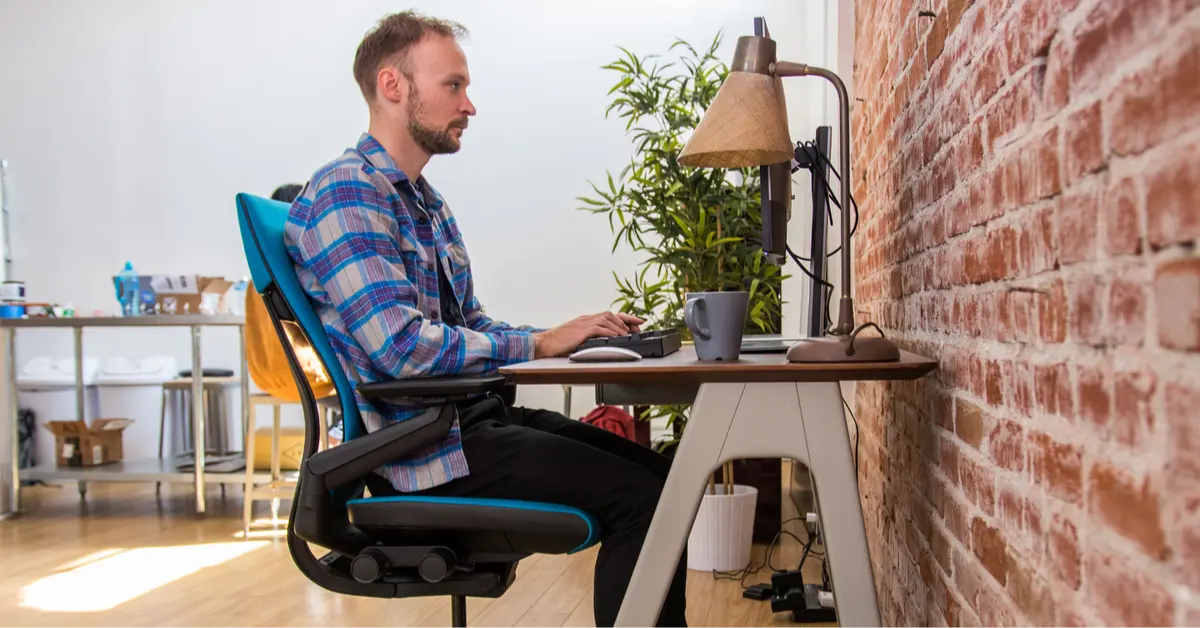
A high-quality ergonomic office chair creates the baseline. Look for seat depth that leaves two to three fingers between the edge and the back of the knees, plus a waterfall front to reduce pressure. Height should allow feet flat on the floor with knees at roughly 90–100 degrees. Armrests matter more than most realize – they need to adjust up, down, in, and out so shoulders can stay relaxed rather than creeping upward.
Lumbar support should meet the natural curve of the lower back, not force a new one. A backrest made from breathable material helps regulate temperature during long sessions. Tilt with tension control adds variety – a slight recline during reading or calls reduces load on the spine, then an upright lock supports typing. When the chair fits, the rest of the setup falls into place faster.
Set desk height to match the body – not the furniture
Desk height determines wrist angle, shoulder load, and how long good posture stays comfortable. The simplest way to remove guesswork is to measure, then confirm with a desk height calculator that converts body height and input devices into a practical starting point. Starting there, perfect your positioning such that your elbows are in a 90-degree position, forearms lie parallel to the surface, and wrists are neutral, not cocked up.
The same holds for standing positions. The shoulders should not spring up to the forearms at the top. If the desk is immobile and too high, elevate the chair and place a footrest to maintain healthy angles for your knees and hips. When it is too low risers or an adjustable frame is the solution. Keep adjustments small and check comfort over a full day – the right number is the one the body forgets about.
Posture that lasts: small moves, big payoff
Static postures tire tissues quickly. The goal is controlled variety – gentle shifts that distribute load. An intelligent solution begins with a chair, which is then adjusted in terms of the desk height, and finally, the peripherals are adjusted, thereby making the entire system work in tandem.
Keep hips raised by a little above the knees to relieve lumbar stress, and alternate to a mid-hip position after some time. Standing: Feet should be hip-width, knees soft, and weight should be distributed equally. A small foot rail or low stool should allow one foot to rest frequently, taking the pressure off the lower back.
Micro-breaks matter. Change positions every 30-45 minutes and stand up for a few minutes, or roll your shoulders and bend your ankles. The screens must be placed at the same or slightly lower than eye level and not tilted downwards. An eye-catching postcard next to the screen – “elbows 90°, shoulders relaxed, feet on the ground” – keeps the checklist in the spot but does not disturb with noise.
Arrange tools so hands and eyes work less
Ergonomics extends to layout. Put the keyboard near the end of the desk so that your wrists do not lift. A tray with a negative tilt can be used to maintain a neutral position of your wrists during longer typing periods. Keeping the mouse at the same level and making it as close as possible will reduce the distance of the reach; a bigger mat may be considered to help the forearm. If a laptop is the primary machine, elevate it to eye level and use an external keyboard and mouse – craning toward a low screen undermines every other upgrade.
Lighting shapes posture, too. A low-glare task lamp angled away from the writing hand reduces screen brightness needs and prevents the forward-head lean that appears when eyes strain. Cable management contributes more than aesthetics – when wires don’t snag, switching between sit and stand is smooth, and adjustments can be made more frequently.
Buy once, set once: a concise selection checklist
- Chair adjustability – seat height/depth, lumbar position, armrest range, and tilt with tension, allowing posture can vary throughout the day.
- Seat and back materials – breathable fabric or mesh for temperature control; cushioned yet supportive foam for longer sessions.
- Desk adjustability – reliable height range that fits the shortest and tallest regular users without maxing out the mechanism.
- Input alignment – keyboard at forearm height with a neutral wrist angle; mouse close enough to avoid shoulder reach.
- Screen placement – top bezel at or slightly below eye level; secondary screens angled in to reduce neck rotation.
- Floor comfort – supportive shoes for standing blocks and an anti-fatigue mat with beveled edges to prevent trips.
This single list covers the variables that decide day-to-day comfort and keeps shopping focused on what the body will notice.
Strong finish: a workspace that helps, not hinders
The best ergonomic setup disappears into routine – quiet joints, steady energy, and posture changes that happen without thought. Start with a chair that fits, use measured desk height rather than guesswork, and treat movement as maintenance rather than an afterthought. With those pieces in place, work requires less effort to feel good, and attention stays on the task instead of on aches.
Comfort is not about chasing perfect angles. It’s about creating a forgiving environment where small adjustments are easy and healthy positions are the default. Choose well once, calibrate carefully, and let the setup carry the load so the mind can do its best work.
Stay in touch to get more updates & alerts on VyvyManga! Thank you


